Search engine phishing is a type of cyberattack where fraudsters manipulate search engine results to promote fake or malicious websites. These sites, which appear to represent actual businesses or services, are created to steal the victim’s sensitive data.
Search engine phishing is also known as SEO poisoning and takes advantage of our tendency to view search engines as a dependable source of accurate and trustworthy information.
How does search engine phishing work?
Here’s a step-by-step process that explains how search engine phishing works in practice.
Step 1 – Cybercriminals create a fake website
In step one, a cybercriminal creates a fake website that mimics an authentic site. To make the site look as convincing as possible, the criminal also incorporates the authentic site's layout and branding. Common targets include banks, tech support services, and eCommerce platforms.
Step 2 – The site is promoted
Next, criminals promote the site to have it appear at the top of the search results. The site must appear in a prominent position for the scam to be effective as just 0.63% of users venture onto the second page of Google's search results.
Sites may be promoted in several ways:
SEO techniques – some criminals use black-hat SEO tactics (such as private link networks) to rank their sites on the first page. Others may target specific keywords, capitalize on trending topics, or utilize other more accepted methods.
URL spoofing – where criminals promote fake sites with URLs that closely resemble those of the legitimate site.
Paid advertising – programs like Google’s Paid Search are also exploited for phishing attacks. Compelling ads are crafted to attract unsuspecting users, and the position of these ads above the fold increases visibility.
Step 3 – Users search for legitimate services
Users search for a service such as online banking or tech support and enter keywords as usual. Since the use of search engines has become so habitual, many users never question the safety of the information they provide.
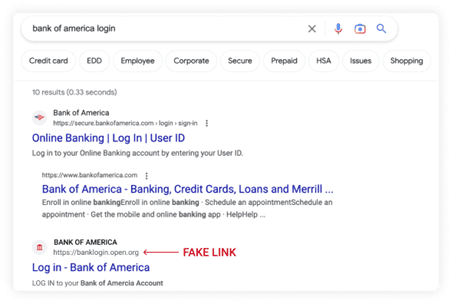
An example of search engine phishing for the keyword “bank of america login". Notice the .org extension on the fake website. (Source: Keeper)
Step 4 – Users land on a phishing website and enter their details
Users then click on the fraudulent link and expect to be directed to the legitimate site. Instead, however, they land on the fake site where their login credentials and other personal information are stolen. In the example above, Bank of America customers are prompted to enter their usernames and passwords on a fake login page.
Other scams may involve malware. In 2022, bad actors tricked users into downloading a free productivity app infected with malware called Batloader. The malware was extremely difficult to detect and was later used to infect systems with ransomware and obtain privileged access to target organizations.
It’s also worth noting that once a user clicks on a compromised search result, they may subject themselves to other types of phishing attacks. These include clone phishing, spear phishing, smishing, and pharming – where users are directed to malicious sites even after entering the correct URL.
Step 5 – Data is collected by the attacker
The victim's information is then collected and used to commit fraud, identity theft, or subsequent phishing attacks. Data may also be sold on the dark web. In the aftermath of search engine phishing, criminals may redirect the victim to the real website to avoid suspicion that an attack has taken place.
The telltale signs of search engine phishing attempts
Spotting search engine scams can be tricky, but here are three common telltale signs.
1 – Offers that are too good to be true
Offers that seem too good to be true are typically seen in eCommerce. Examples of such offers include:
In-demand items that are advertised with a 90% discount (particularly event tickets and gaming systems).
Hotel booking sites that offer substantial discounts (part of clone phishing).
Product descriptions that promise unrealistic results.
Freebies or high-value gift cards offered by well-known brands.
2 – Unusual URLs
We noted earlier that unusual URLs are used to promote search engine scams. They’re also one of the most definitive signs of search engine phishing. So what constitutes an unusual URL?
Most are variations of the legitimate business’s address that criminals hope are subtle enough to avoid detection. Variations include:
Misspellings or extra characters – “www.paypa1.com” instead of www.paypal.com.
Subdomains in the URL – here, the name of the authentic site is a subdomain of the fake site.
Homograph attacks – for example, by changing the lowercase "L" to an uppercase “I”, it is almost impossible to distinguish between “www.google.com” and “www.googIe.com”.
Long URLs with multiple hyphens – like subdomains, hyphens can obscure the destination website.
URLs without HTTPS – while this does not always indicate phishing, legitimate websites almost always use secure HTTPS.
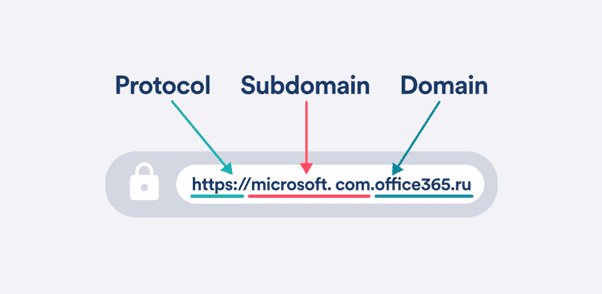
Check the protocol, subdomain, and domain of any suspicious URL. Here, the subdomain is used to obscure the scam. (Source: Surfshark)
Unusual URLs can be extremely effective. Over the space of 3 months in 2021, Chase Bank became the sixth most spoofed brand in the USA after phishing URLs impersonating the bank rose 300%. Behind the rise were so-called “phishing kits” that criminals buy, sell, and use to create their attacks.
3 – Poor website quality
Fake websites tend to be characterized by various obvious and less obvious factors. These include:
Low-quality designs.
Intrusive pop-ups or excessive ads.
Requests for personal information.
Grammatical errors.
Broken links.
Limited functionality.
A lack of contact information.
How to mitigate search engine phishing
Mitigating search engine phishing requires both proactive and reactive measures. To start, companies can monitor search engine results for any fraudulent sites mimicking their brand and notify authorities. This may include the Australian Cyber Security Centre (ACSC), Scamwatch, and the search engine itself.
If a user lands on a suspected phishing site, it is crucial they click away immediately and notify the relevant financial institution(s) if any payment information was entered. Multi-factor authentication (MFA) should also be enabled by default for key accounts.
Browser tools
With the explosion in popularity of remote work, browsers have become a popular means of attack for fraudsters. According to LastPass, 62% of employees use unmanaged devices, which makes safe browsing habits a key line of defense.
Tools like Google Safe Browsing warn employees when they attempt to visit malicious sites or download dangerous files.
Firms that desire an advanced level of security can also opt for:
Real-time checks against lists of known phishing sites.
Protection from unknown attacks when navigating to a site.
Deeper scans of downloaded files to check for viruses and malware.
Customised protections based on the company’s risk tolerance.
Password managers can also be an effective defense. A little-known benefit of these tools is that they won't autofill a user's login credentials if the website address does not match one already stored.
User awareness
Education and awareness campaigns for both customers and employees are critical. Companies can teach users how to recognize phishing sites and stress the importance of verifying URLs, suspicious links, and the presence of an HTTPS connection, among many other measures.
If in doubt, it may also be useful to:
Check to see how long the site has been registered for.
Review mail server, firewall, and DNS logs for suspicious activity.
Research the site. In other words, have others reported it as fraudulent on Reddit, Yelp, or similar?
Summary:
Search engine phishing (also known as SEO poisoning) is a cyberattack where fraudsters manipulate search engine results to promote fake websites that steal personal or financial information.
Some of the telltale signs of search engine phishing include offers that are too good to be true, poor website quality, and unusual or suspicious URL variations.
To mitigate search engine phishing, companies should routinely monitor search results for fraudulent sites imitating their brand. Increased user awareness of scams and the utilization of safe browser and password management tools are also worthwhile.